Discover the Fonts on Any Webpage with this Chrome Extension
Find Out Web Fonts Easily with WhatFont
Chrome Extension
Are you curious about the fonts used on your favorite websites? Do you want to know the elegant typography that catches your eye? Look no further, because there's a
Chrome extension
that makes it incredibly easy to find out the fonts used on any webpage.
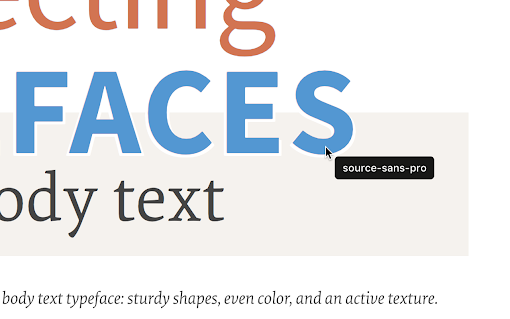
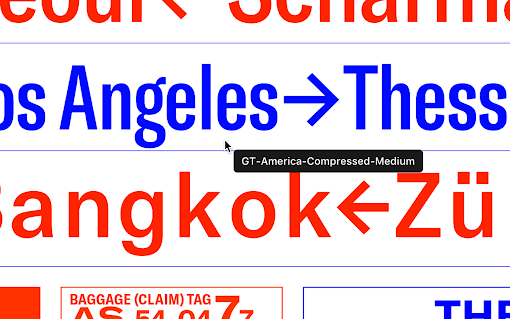
WhatFont is a top-rated Chrome extension that allows you to inspect web fonts with just a simple hover. No need for complex developer tools like Firebug or Webkit Inspector. With WhatFont, anyone can effortlessly uncover the fonts behind a webpage.
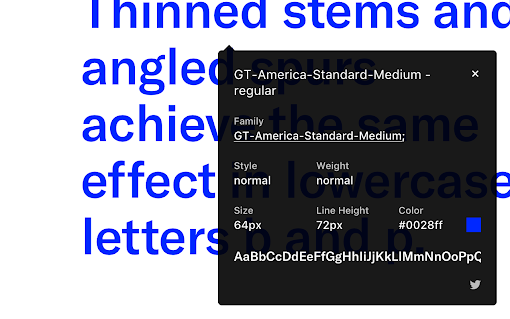
One of the standout features of WhatFont is its ability to detect the font services used for serving web fonts. Whether the webpage relies on Typekit or Google Font API, this extension has got you covered. It provides valuable insights into the font services employed by the website, giving you a deeper understanding of the font choices made by designers and developers.
Don't just take our word for it. WhatFont is highly recommended by reputable sources such as Wired WebMonkey, Lifehacker, and SwissMiss. Its simplicity and effectiveness have earned it praise from professionals across different industries.
How Does WhatFont Work?
After installing the extension, all you need to do is refresh the webpage you want to inspect and click on the WhatFont extension icon. Then, as you hover your mouse over the desired font, WhatFont will display the font details in an elegant and intuitive manner.
Reliable and Valuable: User Reviews Speak for Themselves
With a total rating of 4.03 out of 5 based on user reviews, WhatFont has proven to be a reliable and valuable tool for designers, developers, and font enthusiasts alike. Users have praised its ease of use and effectiveness in identifying fonts. It has received positive feedback from individuals in various fields, including software testing, frontend development, and design.
Constant Improvement for Better User Experience
WhatFont is constantly improving and addressing user feedback. The extension has undergone several updates, including a new design, support for retina toolbar icons, improved sharing options, and enhanced font detection algorithms. The developer behind WhatFont, Chengyin Liu, is actively engaged in refining the extension to meet the needs of its users.
If you have any feedback or suggestions, you can reach out to Chengyin Liu via email at [email protected] or on Twitter at @chengyinliu. You can also find more information about WhatFont on Chengyin Liu's website: http://chengyinliu.com/whatfont.html.
Uncover the Beauty of Web Typography
Discover the world of web typography with ease using WhatFont. Install the extension today and embark on a journey to uncover the fonts that make the web beautiful.
















30 Reviews For This Extension
one of the best extensions .. very helpful
Works good for me so far
Not working on local html files
A simple and handy tool for instantly identifying fonts on any webpage
Really simple, and quite effective.
I love fonts and love finding about new fonts. Works like a charm. Thank you for making this.
Excellent
It just works.
Great
Awesome ! just got what I was looking for.
Amazing extension, very useful for web designers and UI/UX designers. Works great, lot's of useful information within the click.
Works well for me. Does exactly what I needed it to do. When it's enabled I simply click on a piece of writing and the the details of the font and styling appear.
Doesn't detect script or handwriting fonts
Has stopped working 90% of the time.
Worked instantly giving me all the details I needed on the font
does not work anymore
Amazing.
Amazing
Simple and useful. An extension that works.
excellent one.
This my daily usage tool. Love it so much.
This app is fkn amazing. I'm a newbie at web design. This allows me to get inspiration fast from other website and literally cut down my tinkering and trial and error by 20x!! So much faster!!!! THANK YOU!
the bets
the bets
Very good & handy! Loved to use it.
Does not work on Shopify store on 5th Sept. 2024.
Very good & handy!
Doesn't work on images. If you want to know the font this app is just reading the source code of the page or the CSS. waste of time!
100% satisfied!
Color is not appearing incorrect and it always shows black/white.